
~11 min read
Lenovo DCC: Part 2 - Trusted IPC and a Malicious Firmware Update
, commonly deployed in Windows enterprise environments, could be used for local privilege escalation. In the first part of this series, we have presented two ways how to gain local administrative access. In this post, we dive into IPC communication and how to exploit trusted IPC communication from a low privileged service process to get admin privileges in a different way.](/_astro/lenovo_bug2_rpc_wide.C5IVqaiV_1hQDrK.webp)
TL;DR
The Lenovo Display Control Center, commonly deployed in Windows enterprise environments, could be used for local privilege escalation. In the first part of this series, we have presented two ways how to gain local administrative access. In this post, we dive into IPC communication and how to exploit trusted IPC communication from a low privileged service process to get admin privileges in a different way.
Introduction
In the first blog post of this series, we introduced the Lenovo Display Control Center (DCC) and its multi-process structure. While the initial post covered a simple yet effective local privilege escalation, this follow-up post examines structural weaknesses arising from trusted IPC communication with untrusted processes.
While most parts of the DCC services don’t require high privileges to operate on the system, there are three exceptions:
- The
LenovoDCCBackGroundService.exe, the initial process, started as a Windows background service. This service naturally needs high privileges, as it runs in the context of theSYSTEMuser. - The
FirmwareInstaller.exe, executing a Lenovo display firmware update, which requires high privileges. This process is started only upon demand. - The
DCCDataHelper.exe, which can load and start the LenovoWinRing0.sysdriver. This driver is good for some surprises; we might cover this driver in another part of this series.

Lenovo DCC services and their integrity levels
All DCC services require to interact with one another. On Windows, there are several mechanisms for implementing local Inter-Process Communication (IPC), including:
- Windows Communication Foundation (WCF) for .NET applications: arguably the easiest way to implement IPC for .NET applications.
- Remote Procedure Calls (RPC): internally abstract the pain of a raw named pipe implementation.
- Raw Named Pipe implementations: exchange messages on a custom-built protocol.
Examining the import table of the main LenovoDisplayControlCenterService application, we can quickly identify some typical RPC functions.
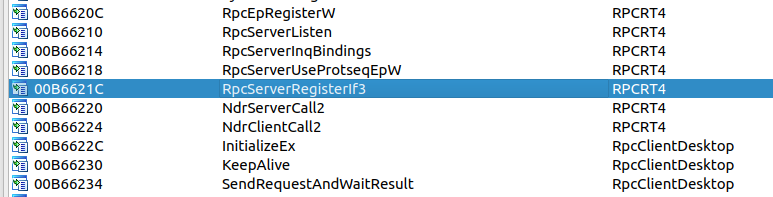
Typical RPC functions imported from the RPCRT4 and RpcClientDesktop libraries
The RpcServerRegisterIf3 function indicates that the LenovoDisplayControlCenterService is mainly responsible for handling all RPC communication as the RPC server.
This is an interesting design choice, as the LenovoDisplayControlCenterService runs as a MEDIUM integrity process and, thus, can be manipulated by an attacker. 🤔
If you are interested in learning how Windows RPC API internals work, we highly recommend the excellent Offensive RPC blog post by csandker. For this blog post, it is enough to know that RPC is a powerful but sensitive communication mechanism.
Reverse Engineering and Exploiting the DCC
Enabling Debug Output
The DCC binaries contain numerous debug strings. However, these debug strings are never printed. So, how can we see them?
During service startup, it is checked whether %PROGRAMDATA%/Lenovo/LenovoDisplayControlCenterService/config.log exists.
Code analysis reveals that the service expects specific JSON-encoded fields, such as log, isShowConsole, or extendDllPath.
These fields are loaded into a CProfile class structure and referenced throughout the application.
Let’s create a simple config.json with the service-specific fields to print the log file:
{"extendDllPath":"C:/test123/dllpath", "isShowConsole":true, "log":true}After a service restart, we are greeted by a verbose console output of the LenovoDisplayControlCenterService application:
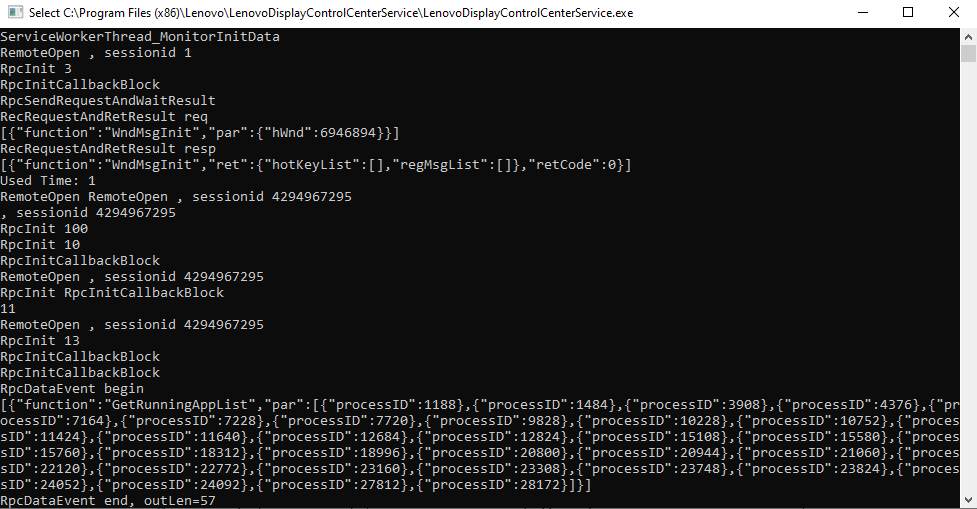
Lenovo DCC verbose console output
Nice! This greatly simplifies reverse engineering, particularly when it comes to identifying functions. And, as a bonus, we even get a the RPC events log printed to the console!
Deep Dive into the RPC Methods
Now, let’s return to the RPC communication, which is the primary method by which the DCC services interact with one another.
Having previously exploited RPC communication in AV/EDR products, we again relied on the excellent Akamai RPC Security Research repository.
We just needed to adjust some offsets in the PE RPC Scraper to support 32-bit binaries.
Straight up, we could identify the RPC interface 5c431198-90d5-4564-b645-904fd04d119d and its methods:
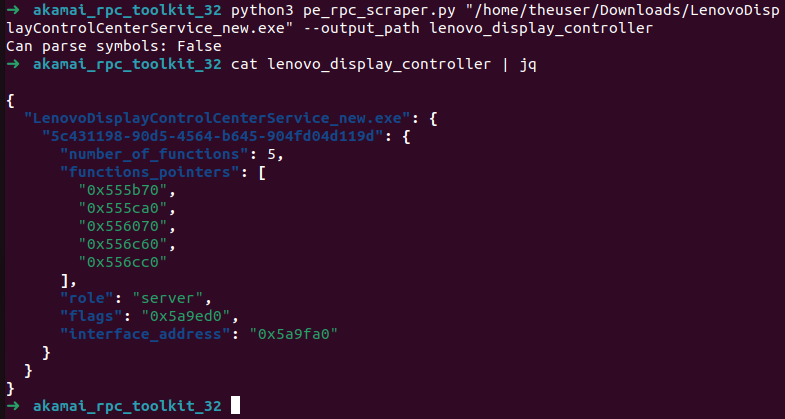
RPC interfaces and function pointers identified by the Akamai RPC Toolkit
We also used RpcView to identify the RPC interface by its GUID and can grab “decompiled” interface definitions:
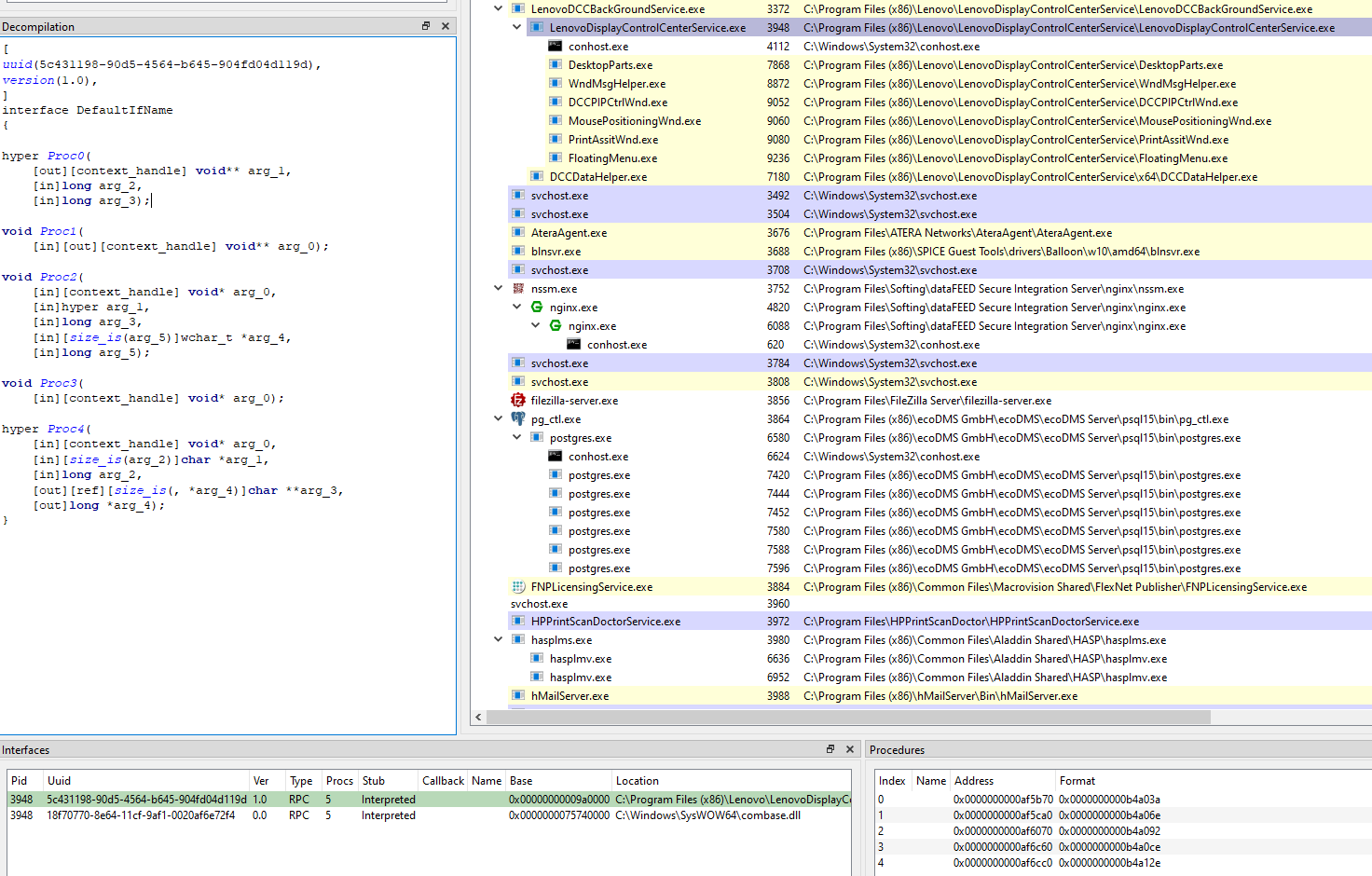
RPC interface identified and decompiled in RpcView
Having established a rough idea of the RPC interfaces, we started to analyze a client.
Some of the RPC logic seemed to be bundled in the RpcClientDesktop.dll, which is used by multiple other DCC executables.
Checking the export table for RpcClientDesktop.dll revealed five exported functions in total, which might match the five RPC functions identified by RpcView. From their names it seems that the RPC interfaces can be used to set up and close the RPC connection, send some KeepAlive packets and send blocking requests using the SendRequestAndWaitResult method.
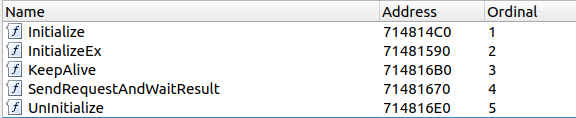
Export table of the RpcClientDesktop.dll binary
As mentioned earlier, the DCC comprises multiple components, some written in C++, while others are written in .NET. The .NET binaries, however, still utilize the very same RpcClientDesktop.dll, leveraging the native PInvoke feature of the .NET framework.
Some DCC components, such as FloatingMenu.exe, DesktopParts.exe, and PrintAssistWnd.exe, which utilize RpcClientDesktop.dll, are written in .NET.
We can use dnSpy to analyse those binaries and revealed the parameters and usage instructions of the RpcClientDesktop.dll:
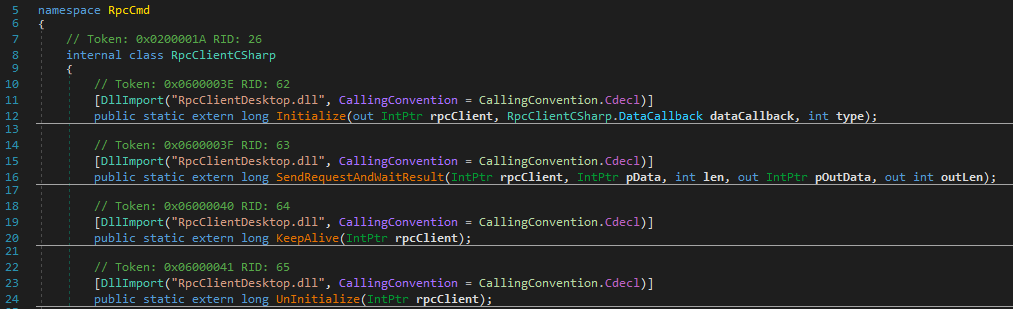
PInvoke definitions of the native RpcClientDesktop.dll
Those PInvoke definitions cover four of the five export functions identified by RpcView.
We’ll come back to the remaining export function InitializeEx later on.
Let’s first have a look at the .NET binary FloatingMenu.exe to see how the RPC interface is used:
- The
Initializemethod returns a pointer to an internal RPC object. It also defines a callback function for data retrieval and accepts a “component ID”. Different components use different component IDs (e.g.,100,10, and13), which can actually be seen in the DCC console output above. - The
SendRequestAndWaitResultmethod synchronously sends an input pointer and its length to the binary (SendRequest), and in return receives an output pointer along with the output data length (WaitResult). - The
KeepAlivemethod appears to block indefinitely and never return from the initial call, suggesting it is run in a separate thread. - The
Uninitializemethod destroys the RPC object, which is not much of interest for us now.
The SendRequestAndWaitResult is especially interesting: it passes a JSON object containing two properties, func (the function name) and par (another JSON object for parameters).
You can also see this JSON request in the DCC console debug output above.
By now we know how to send synchronous blocking requests.
But what about asynchronous data retrieval which is used to notify other components about new data?
How does a DCC software component receive requests that are not directed to the main “message router” component?
This is where the blocking KeepAlive method comes into play.
Internally, the “message router” (the RPC server) blocks the response to the KeepAlive call.
Once events occur on the server side, an NdrClientCall3 is triggered to notify the client about the event.
While we haven’t investigated this in depth, this appears to be how asynchronous notifications are handled.
Attacking the RPC interface
Now that we have a rough understanding of the RPC interface and its communication we can think about attacking it. Several ideas come to mind:
- Hosting our own RPC server with the interface UUID
5c431198-90d5-4564-b645-904fd04d119don the same RPC. If some privileged actions are requested from the other DCC components, it might be possible to hijack the communication. - DLL injection into the main RPC server process
LenovoDisplayControlCenterServiceand hooking the RPC calls inside the RPC server. Once interesting methods are triggered, we can replace their parameters and even the function name. - Attaching a debugger to the
LenovoDisplayControlCenterServiceand modifying parameters on the fly.
The following screenshot shows our approach trying the first method.
The red box highlights the different registrations for the DCCDataHelper.exe service with IDs 10, 11 and 13, respectively. This is done using proc2, which is the InitializeEx call.
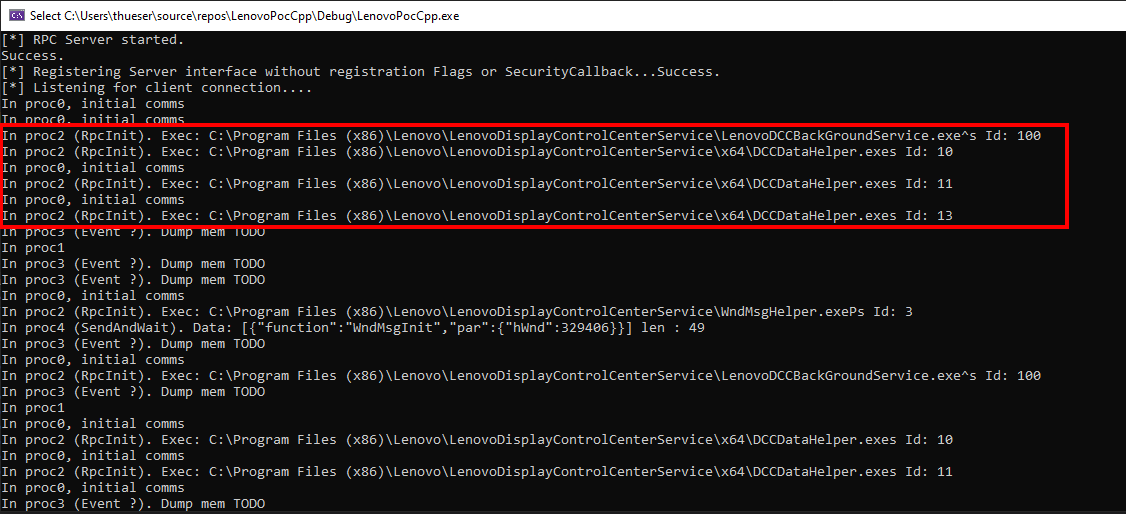
Our own RPC server printing the arguments to the RPC client calls
Although the PoC with our own RPC gave us more insights, passing the right structures with callbacks quickly became quite challenging. So we went with the second (DLL injection) and third approach (Userspace Debugger).
Internally, we hijacked the mentioned NdrClientCall3 and just adjusted the JSON string parameter, and its length on the stack.
As NdrClientCall3 only responded to one single component (i.e. no broadcasting), we were restricted to components that actively communicated with the RPC server.
Some components never sent messages to the server, despite being connected.
For example, the high privileged LenovoDCCBackGroundService.exe seemed to contain potentially interesting methods but we had no idea how to invoke them.
The LenovoDisplayControlCenterService, on the other hand, provided some helper classes to invoke certain method, but calling them directly often ended in crashes.
Internally the crashes stemmed from C++ ATL strings, which were hard to set up properly.
Analyzing and Interacting with the LenovoDCCBackGroundService
Ultimately, we were able to craft an exploit that enabled us to intercept and modify messages sent to components. Buckle up for some binary analysis necessary to understand the exploit.
Searching for strings in the LenovoDCCBackGroundService.exe binary, the high privileged service we wanted to target, we could identify multiple RPC functions:
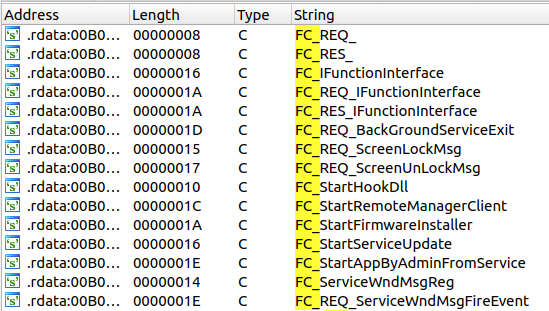
Exposed RPC methods of the high privileged LenovoDCCBackGroundService.exe
Unfortunately, the seemingly quick win FC_StartAppByAdminFromService turned into a rabbit hole:
When this method is called, the service creates a scheduled task with a start time two seconds in the future.
Although the task is configured to run with the “highest available privileges”, it still executes within the user’s context. 😞
So, next, we tested the StartFirmwareInstaller method, that we found thanks to its x-refs:
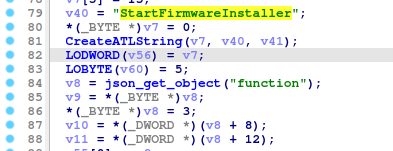
StartFirmwareInstaller function excerpt showing the JSON parsing
Once the function JSON field has been parsed, the strings in the remaining function hint to the interesting argument adminUser:
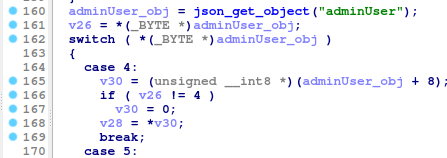
adminUser JSON field parsing and type identification
Eventually, depending on the boolean adminUser, the firmware installer is started!
- When
adminUseristrue, a scheduled task running with the highest privileges in the user context is created and executed (seeStartAppByAdminFromServiceabove) - When
adminUserisfalse, theFWInstaller.exeis executed byCreateProcessWwithout impersonation. The means that theFWInstaller.exenow also runs in theSYSTEMcontext!
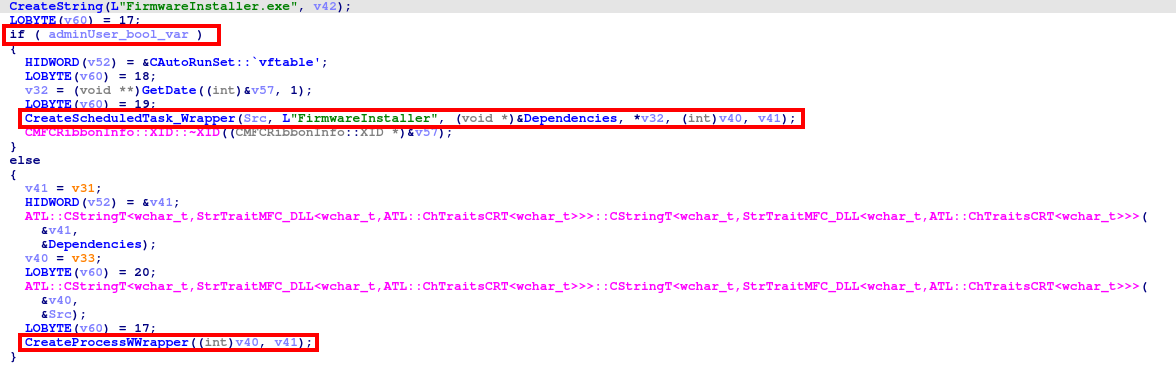
Different ways of process creation depending on the adminUser property
Reversing the RPC client that sends the StartFWInstaller message revealed that the adminUser field is set depending on the current user and whether they are a member of the local administrators group.
One question still remained:
How can we trigger this function and set adminUser to false?
We managed to create new threads in the RPC server using the DLL injection mentioned above, eventually calling the RPC interface. But this was very unstable and fairly complicated. In the end, we just used the DCC WMI Interface to trigger a legit firmware update, which conveniently was stored in a different folder on our laptop.
Finishing the Exploit
Now that we have a way to trigger the firmware installer as SYSTEM via WMI, let’s analyze the FirmwareInstaller.dll binary.
The DLL “entryPoint” is WinMain, where several known imports can be found:
The Initialize(Ex) and KeepAlive call from the RpcDesktopClient.dll:
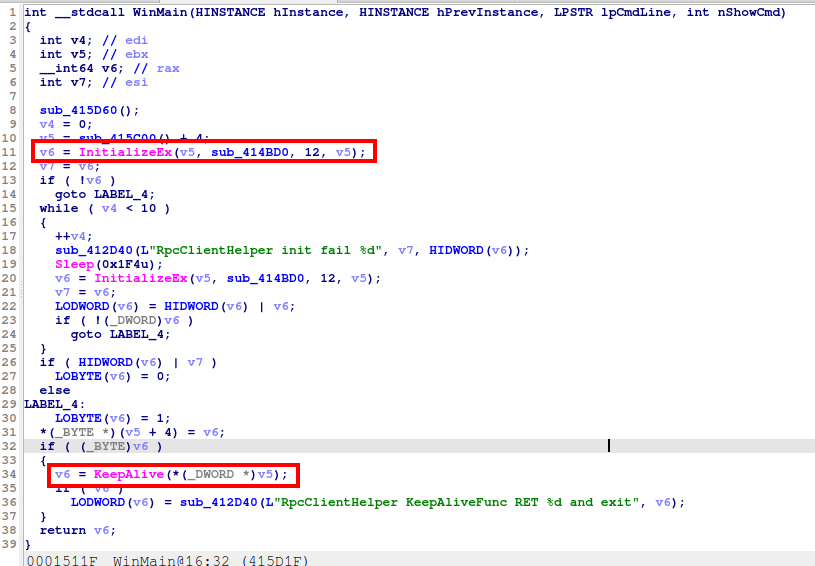
Entrypoint of the FirmwareInstaller.dll using the RpcDesktopClient.dll
Looks like the data retrieval callback is sub_414BD0 and the firmware installer registers itself as RPC component with id = 12.
Looking at the “exposed RPC functions” using the strings, we can identify the StartFWExe method:
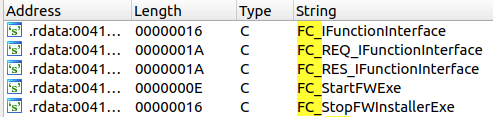
Exposed RPC methods of the FirmwareInstaller.dll
Lets skip some of the reverse eningeering and take a shortcut here:
Analyzing the code reveals two JSON field parameters to this RPC call: exePar, a parameter passed to the executable to be started, and exePath, a full path to the firmware update executable.
Both values are base64 encoded:

Intercepted NdrClientCall3 invocation in the central RPC server
The exploitation is now as easy as:
- Attach a debugger to the
LenovoDisplayControlCenterService(low privilege), breakpoint atNdrClientCall3 - Trigger a firmware update via PowerShell WMI, specifying a legit firmware update zip archive in the RPC call.
- Intercept the final RPC call to
StartFWExeand exchange parameters on the stack. Or simply replace the executable that is called by theStartFWExeinvocation, as this is in a writable TEMP AppData folder. - Let the high privilege service execute a binary that adds the user to the local admin group
And we are done! 🍉
Closing Notes
The root cause of this privilege escalation can be traced back to the LenovoDisplayControlCenterService.exe process, which acts as “router” for all RPC messages. Since this process can be modified from a low-privilege user context, we can intercept and modify data in the RPC communication. However, obtaining the right components and RPC messages was quite challenging and would have taken significantly longer without the WMI firmware update trigger.
The blog post still covered our methodology of reverse engineering the DCC components, eventually leading to a privilege escalation to SYSTEM.
The findings were reported to Lenovo, and the following CVE was assigned:
The communication with the Lenovo PSIRT was a very good experience. They quickly acknowledged the findings, gave status updates about the fixes and provided a timeline for the patches. Kudos to them!
Report Timeline
| Date | Action |
|---|---|
| 22.04.2024 | Reported to the Lenovo PSIRT via PGP encrypted email |
| 22.04.2024 | Acknowledge of the report from the PSIRT, assigning an internal issue ID |
| 10.05.2024 | Update from PSIRT with CVE numbers, fixes and advisory timeline be published on August 13, 2024 |
| 23.07.2024 | Lenovo released a patched version in their support website |
| 23.07.2024 | Feedback from Neodyme that the patch can be bypassed via a TOCTOU issue |
| 26.08.2024 | New release with a fixed version scheduled on 30.11.2024, with an advisory on 10.12.2024 |